17
N E W
M Y C I R C U I T — I N S T A L L A T I O N
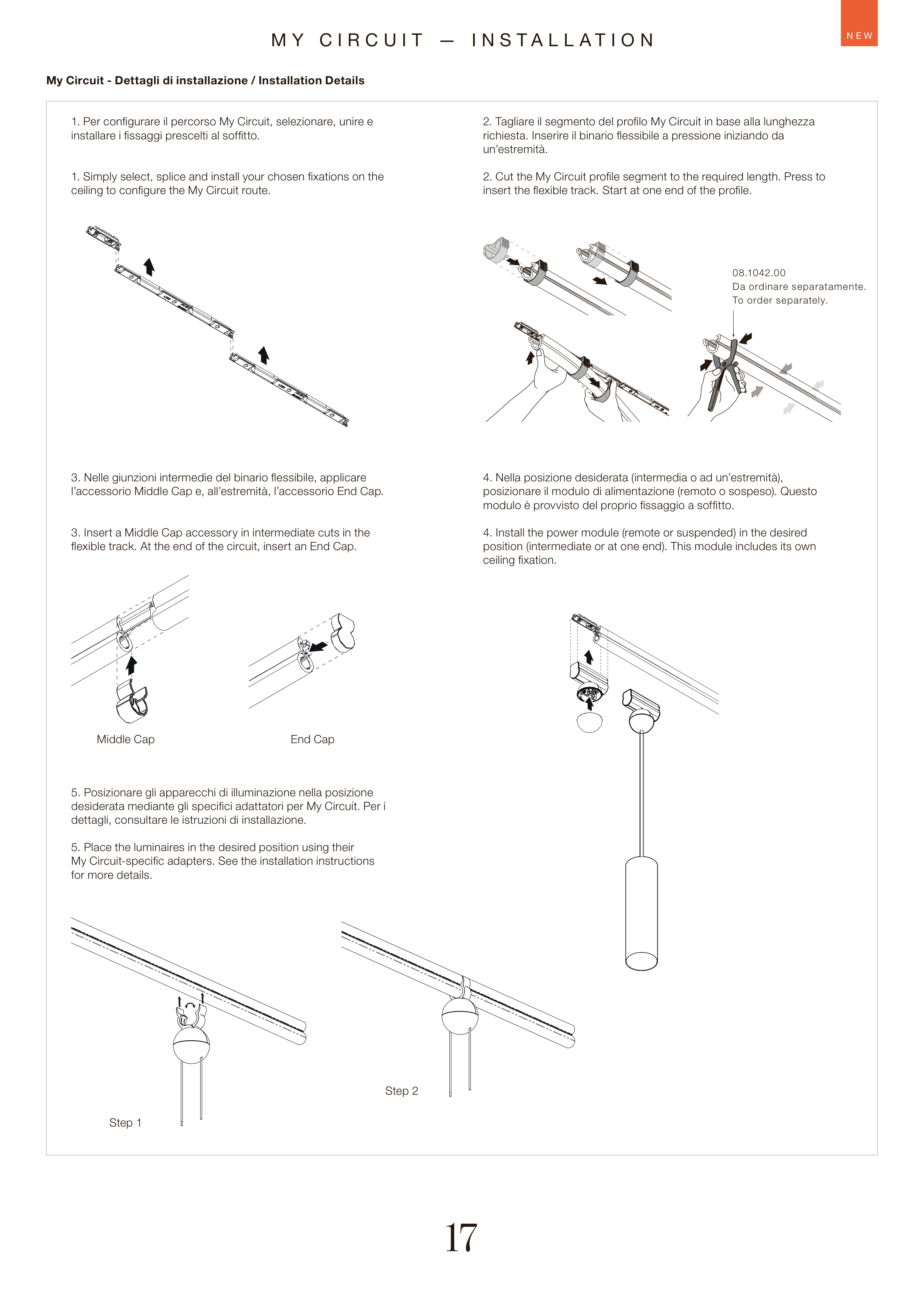
Middle Cap
Step 1
Step 2
End Cap
My Circuit - Dettagli di installazione / Installation Details
1. Simply select, splice and install your chosen fixations on the
ceiling to configure the My Circuit route.
3. Insert a Middle Cap accessory in intermediate cuts in the
flexible track. At the end of the circuit, insert an End Cap.
5. Place the luminaires in the desired position using their
My Circuit-specific adapters. See the installation instructions
for more details.
2. Cut the My Circuit profile segment to the required length. Press to
insert the flexible track. Start at one end of the profile.
4. Install the power module (remote or suspended) in the desired
position (intermediate or at one end). This module includes its own
ceiling fixation.
1. Per configurare il percorso My Circuit, selezionare, unire e
installare i fissaggi prescelti al soffitto.
3. Nelle giunzioni intermedie del binario flessibile, applicare
l’accessorio Middle Cap e, all’estremità, l’accessorio End Cap.
5. Posizionare gli apparecchi di illuminazione nella posizione
desiderata mediante gli specifici adattatori per My Circuit. Per i
dettagli, consultare le istruzioni di installazione.
2. Tagliare il segmento del profilo My Circuit in base alla lunghezza
richiesta. Inserire il binario flessibile a pressione iniziando da
un’estremità.
4. Nella posizione desiderata (intermedia o ad un’estremità),
posizionare il modulo di alimentazione (remoto o sospeso). Questo
modulo è provvisto del proprio fissaggio a soffitto.
08.1042.00
Da ordinare separatamente.
To order separately.